public static void validateXMLAgainstSchema(InputStream xmlStream, InputStream schemaStream) throws SAXException, SAXParseException, ParserConfigurationException, IOException {

  SchemaFactory schemaFactory = SchemaFactory.newInstance( XMLConstants.W3C_XML_SCHEMA_NS_URI );
  schemaFactory.setErrorHandler( new DefaultHandler());
  Schema schemaXSD = schemaFactory.newSchema(new StreamSource(schemaStream));
  Validator validator = schemaXSD.newValidator();
  DocumentBuilder parser = DocumentBuilderFactory.newInstance().newDocumentBuilder();
  Document document = parser.parse(xmlStream);
  validator.validate( new DOMSource( document));
  }
lunedì, febbraio 23, 2009
Validate xml against the schema
The code is a an adjustment of what published in this post, just using InputStream instead of File as arguments for schema and xml.


giovedì, febbraio 05, 2009
Monologo fantastico
caro Jack ho conosciuto un capitano dell' aviazione, ci siamo innamorati. Voglio il divorzio per potermi risposare con lui, so che puoi negarmelo ma te lo chiedo lo stesso in nome di tutto quello che ci ha unito, dei ricordi. Perdonami...Jack c'era troppa solitudine. Un giorno ci rincontreremo, persone che sono state così vicine come noi si rincontrano sempre. Non ho alcun diritto di dirti queste cose, ma non riesco ad impedirmelo. E' un legame così difficile da spezzare.
Oh compagno di tutti quegli anni splendenti aiutami a lasciarti.
venerdì, gennaio 09, 2009
spring message tag libray
If you are using spring message tag library you know how much is annoying get a runtime exception in the case you have inserted a wrong code as attribute.
For every message code tag library you define in your jsp you have to add the corresponding property entry in the message.properties file but can happen you forget to insert it or maybe you insert a wrong value.
For example having such tl message where the code is Email
I have to define the corresponding entry in the file message.properties, or in more files depending on the type of internationalization I use.
A way to avoid to get the runtime exception, in case of wrong code, is to add the property text to the message tl. In case of not matching the value of text will appear in the page and you could fix the problem after. Better to use text property with ? before and after the string so that you can easily understand there is a wrong value of code.
Therefore use
As usual, thanks to Lucio.
For every message code tag library you define in your jsp you have to add the corresponding property entry in the message.properties file but can happen you forget to insert it or maybe you insert a wrong value.
For example having such tl message where the code is Email
<spring:message code="Email" />
I have to define the corresponding entry in the file message.properties, or in more files depending on the type of internationalization I use.
Email=E-Mail
A way to avoid to get the runtime exception, in case of wrong code, is to add the property text to the message tl. In case of not matching the value of text will appear in the page and you could fix the problem after. Better to use text property with ? before and after the string so that you can easily understand there is a wrong value of code.
Therefore use
<spring:message code="Email" text="?Email?"/>
As usual, thanks to Lucio.
domenica, dicembre 28, 2008
BLOB type in MySQL
I had this exception when I was trying to insert a big image in a BLOB column using MySQL.
The problem didn't happen with small images, i.e. with the size of 2,3Kb. After spent some time to investigate about the problem, I understood that the reason is due to the BLOB type in MySQL whose maximum size is 64k. Therefore if you want to store big binary data in a MySQL database you need to use another blob type as MEDIUMBLOB or LONGBLOB.
If you are using JPA annotations to define your tables you need to specify the length of your BLOB attribute using the @Column annotation.
Here is what I have defined for the picture attribute used in jugevents application.
In this way the type of the column corresponding to the picture attribute will be MEDIUMBLOB instead of BLOB and you won't get that exception
java.sql.BatchUpdateException: Data truncation: Data too long for column 'picture' at row 1
The problem didn't happen with small images, i.e. with the size of 2,3Kb. After spent some time to investigate about the problem, I understood that the reason is due to the BLOB type in MySQL whose maximum size is 64k. Therefore if you want to store big binary data in a MySQL database you need to use another blob type as MEDIUMBLOB or LONGBLOB.
If you are using JPA annotations to define your tables you need to specify the length of your BLOB attribute using the @Column annotation.
Here is what I have defined for the picture attribute used in jugevents application.
@Lob
@Basic(fetch = FetchType.LAZY)
@Column(length=1048576)
public byte[] getPicture() {
  return picture;
}
In this way the type of the column corresponding to the picture attribute will be MEDIUMBLOB instead of BLOB and you won't get that exception
venerdì, dicembre 05, 2008
Auto injected spring beans
A colleague of mine asked me to solve a problem about using beans, configured using the spring container, in legacy code.
Basically he couldn't change the way those beans are created but he wanted to be able to inject their properties using a spring configuration file.
This is the way he wants to create an instance of the class BeanAutoInjecting.
The class BeanAutoInjecting has its attributes injected by spring container but we don't want to have any trace of Spring in the code that use this class.
A friend of mine, Lucio, proposed me to use the class AutowiredAnnotationBeanPostProcessor to sort out this problem.
Therefore we have to modify the constructor of the class BeanAutoInjecting in this way:
The trick is to define a dummy constructor and to instruct the spring container to use it. Here the dummy constructor
Here the definition of the bean and the auto-wiring directive in the spring configuration file.
That's cool I would say, I am able to use a spring managed bean in my legacy code creating it out of the spring container!!!
Basically he couldn't change the way those beans are created but he wanted to be able to inject their properties using a spring configuration file.
This is the way he wants to create an instance of the class BeanAutoInjecting.
BeanAutoInjecting bai = new BeanAutoInjecting();
The class BeanAutoInjecting has its attributes injected by spring container but we don't want to have any trace of Spring in the code that use this class.
A friend of mine, Lucio, proposed me to use the class AutowiredAnnotationBeanPostProcessor to sort out this problem.
Therefore we have to modify the constructor of the class BeanAutoInjecting in this way:
public BeanAutoInjecting()
 {
ApplicationContext ctx = SpringLoader.getApplicationContext();
AutowiredAnnotationBeanPostProcessor aabpp = (AutowiredAnnotationBeanPostProcessor)ctx.getBean(
"org.springframework.context.annotation.
internalAutowiredAnnotationProcessor");
aabpp.processInjection(this);
 }
The trick is to define a dummy constructor and to instruct the spring container to use it. Here the dummy constructor
public BeanAutoInjecting(int a)
{
System.out.println("I am the dummy constructor!");
}
Here the definition of the bean and the auto-wiring directive in the spring configuration file.
<!-- auto wiring directive -->
<context:component-scan base-package="spikes.springexamples"/>
---------------------------
<!-- bean definition with dummy constructor ->
<bean name="beanAutoInjecting" class="spikes.springexamples.BeanAutoInjecting">
<constructor-arg>15</constructor-arg>
</bean>
That's cool I would say, I am able to use a spring managed bean in my legacy code creating it out of the spring container!!!
sabato, novembre 08, 2008
I love jugevents
Just to say that I am really lucky to be one of the developers of jugevents, according to me the best ever web application I have worked on. I mean, nothing special over there but all is rational, logic, simple.
Just an example, in development I need to test the functionality add new jugger but I don't want to send emails every time I test it, because I have previously test that service. Well, I only need to mock the dependency to the mail sender bean in this way
And it's done. Honestly think for a while about one of the crap application you are working on in your job. Could you easily mock the dependencies as easily as we do in jugevents? Well I think the answer is no.
I should dedicate more time in development jugevents as it's good for my education and even for my mood.
Just an example, in development I need to test the functionality add new jugger but I don't want to send emails every time I test it, because I have previously test that service. Well, I only need to mock the dependency to the mail sender bean in this way
<bean id="mailSender" class="it.jugpadova.mock.ParancoeMockMailSender"/>
And it's done. Honestly think for a while about one of the crap application you are working on in your job. Could you easily mock the dependencies as easily as we do in jugevents? Well I think the answer is no.
I should dedicate more time in development jugevents as it's good for my education and even for my mood.
domenica, ottobre 19, 2008
Flights web site
Finally I have found a nice web site to find international cheap flights, very easy to use and with really complete search results. Have a try at http://www.tickets-to-europe.com/
lunedì, ottobre 13, 2008
Ubuntu Window Grouping
The default window grouping setting in ubuntu results in opening a separate tab, in the bottom bar, for every application running.
i.e. if you are using skype and you are talking with 3 different users you will see three different tabs in the bar.
In order to change the window grouping settings follow this steps:


i.e. if you are using skype and you are talking with 3 different users you will see three different tabs in the bar.
In order to change the window grouping settings follow this steps:
- Right click on the bottom bar, on the left (in the visible space);
- Preferences
- Check Always group windows

venerdì, ottobre 10, 2008
Refreshing cache DNS in Windows
In Windows there is cache for DNS. In order to refresh the cache from command line and refer to the correct IP you need to execute this command:
After that verify the correct IP of the website you want to connect using:
Thanks to my colleague Roman.
$ ipconfig /flushdns
After that verify the correct IP of the website you want to connect using:
$ tracert <myWebSite>
Thanks to my colleague Roman.
lunedì, ottobre 06, 2008
Chain commands with maven
If you need to run two (or more) maven command in cascade you can chain these two commands in the following way:
Example:
instead of:
Thanks again to Lucio.
$ mvn commandA commandB
Example:
$ mvn clean install
instead of:
$ mvn clean
$ mvn install
Thanks again to Lucio.
martedì, luglio 29, 2008
org.eclipse.core.runtime.AssertionFailedException in Eclipse RCP
If you are working on development (or bug fixing) of a eclipse-plugin application and you get this error:
or any eclipse specific error, in order to find out the real exception thrown by your code proceed in this way:
Thanks to Roman ;)
org.eclipse.core.runtime.AssertionFailedException: assertion failed:
or any eclipse specific error, in order to find out the real exception thrown by your code proceed in this way:
- Right click on the error message;
- Open log
Thanks to Roman ;)
sabato, maggio 31, 2008
MySQL case sensitive in linux
MySQL table names are case-sensitive depending on the filesystem of the server. e.g. insensitive on Windows & Mac HFS+, Case sensitive on Unix.
It means that if you have stored the table PIPPO (upper case) in your database, the select query:
select * from pippodoesn't work and it returns a message like ..."table pippo doesn't exist".
In order to prevent this problem you have to set set lower_case_table_names=1 in your /etc/mysql/my.cnf file. In this way the mysql server will store the table in the file system using lower case.
Here the steps I have followed:
- Chek the status of lower_case_table_names typing:
$ mysqladmin -uroot -p variables $ sudo gedit /etc/mysql/my.cnf- edit the file adding the entry lower_case_table_names=1 just under the group definition: [mysqld]
[mysqld]
#
# * Basic Settings
#

#
# * IMPORTANT
#   If you make changes to these settings and your system uses apparmor, you may
#   also need to also adjust /etc/apparmor.d/usr.sbin.mysqld.
#

lower_case_table_names=1

user  = mysql
pid-file = /var/run/mysqld/mysqld.pid
socket  = /var/run/mysqld/mysqld.sock
port  = 3306
basedir  = /usr
datadir  = /var/lib/mysql
tmpdir  = /tmp
language = /usr/share/mysql/english
skip-external-locking - shutdown the mysqlserver:
$ mysqladmin -uroot -p shutdown - start the mysqlserver:
$ sudo mysqld & - Chek the new status of lower_case_table_names typing:
$ mysqladmin -uroot -p variables - Remember that you have to re store the tables in the database, the best way to do that is dropping your database and running the SQL script.
- Test if works running a query like
$ select * from pipposupposing you have stored PIPPO upper case
I ran this configuration with ubuntu 8.0.4, dell XPS1530, mysql 5-0
Enjoy with MySQL on linux.
dell XPS 1530 + ubuntu = fast
Here the log after executed mvn install on parancoe (trunk). Before I ran the command mvn clean, so the total time includes the compile step.
21 seconds not bad at all.
21 seconds not bad at all.
[INFO]
[INFO]
[INFO] ------------------------------------------------------------------------
[INFO] Reactor Summary:
[INFO] ------------------------------------------------------------------------
[INFO] Parancoe .............................................. SUCCESS [2.784s]
[INFO] Parancoe Yaml ......................................... SUCCESS [5.407s]
[INFO] Parancoe Core ......................................... SUCCESS [9.599s]
[INFO] Parancoe Web .......................................... SUCCESS [2.964s]
[INFO] ------------------------------------------------------------------------
[INFO] ------------------------------------------------------------------------
[INFO] BUILD SUCCESSFUL
[INFO] ------------------------------------------------------------------------
[INFO] Total time: 21 seconds
[INFO] Finished at: Sat May 31 02:15:55 IST 2008
[INFO] Final Memory: 37M/132M
[INFO] ------------------------------------------------------------------------
install activation with maven
Problem
Link
activation
Command
[ERROR] BUILD ERROR
[INFO] ------------------------------------------------------------------------
[INFO] Failed to resolve artifact.

Missing:
----------
1) javax.activation:activation:jar:1.1.1

  Try downloading the file manually from the project website.
Link
activation
Command
mvn install:install-file -DgroupId=javax.activation -DartifactId=activation -Dversion=1.1.1 -Dpackaging=jar -Dfile=activation.jar
giovedì, maggio 29, 2008
Executing main class with maven
If you want to run the main class of your application, let say mypackage.Pluto from maven, just run this command:
That's great, easy, simple...that's the maven way. Thanks to Lucio.
$ mvn exec:java -Dexec.mainClass=mypackage.PlutoThat's great, easy, simple...that's the maven way. Thanks to Lucio.
giovedì, aprile 03, 2008
Installing cruisecontrol as service on windows XP
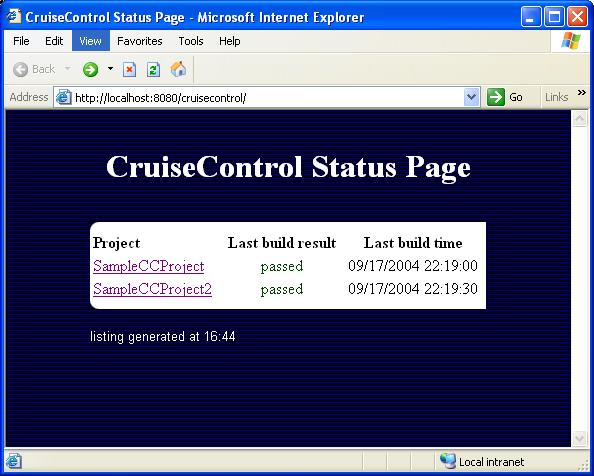
Here the steps I have followed in order to install and run cruisecontrol as a windows service.
- Download cruisecontrol. I used the version 2.6.2 windows installer.
- Run the installer and check the windows service box.
- Remove the service using the command: $ sc delete CruiseControl
- Go to <CRUISE_HOME> folder and edit the wrapper.conf file and be sure it contains the following entry:
# Application parameters.
# Add parameters as needed starting from 1
wrapper.app.parameter.1=CruiseControlWithJetty
wrapper.app.parameter.2=-jmxport
wrapper.app.parameter.3=8000
wrapper.app.parameter.4=-configfile
wrapper.app.parameter.5=config.xml
wrapper.app.parameter.6=-rmiport
wrapper.app.parameter.7=1099
wrapper.app.parameter.8=-webport
wrapper.app.parameter.9=8180 - I set the listening port of cruisecontrol to 8180, you can change the value as you like.
- Open a dos windows corresponding to <CRUISE_HOME> folder and type: $ wrapper -i wrapper.conf
- You should read the message: "wrapper | CruiseControl Service installed."
- Try to open a browser at the url: http://localhost:8180
- If you see the normal screen of cruisecontrol you have been lucky (not like me) and you are done!.
- ...Otherwise...If you see an error like 500 code open the wrapper.log under the log folder. Check for a message like:
Unable to find a javac compiler;
com.sun.tools.javac.Main is not on the classpath.
Perhaps JAVA_HOME does not point to the JDK.
proceed with the following item. - Copy the file tools.jar to <JAVA_HOME>\jre\lib\ext folder. I found this solution here.
- Restart the service, it should be works.
- If still doesn't work... copy the tools.jar also under the folder
/lib/ext
Maybe there is a faster and easier process to have cruisecontrol running as service. Anyway if you follow this guide you will successfully configure cruise as service.
venerdì, marzo 28, 2008
Do not make complex simple things
I can't say much more, just I was wondering why do people tend to complicate all the things that could be easily developed, why do I need a bus to go to work if I am alone in the bus, why do I need an expansive computer if I have only to use excel, and why do I need to define another language if I can use well known languages to do the same. So why I have to spend 1000 eur for a watch when I could spend 50 to achieve the same result, that is checking the time. Keep things easy and you would be loved, common patterns, common words. Ask yourself what are you going to produce, what the costumer wants and try to realize it as simple as you can, there is no way to invent things if they are already available, and most of them for free. Look at jugevents, it's one of the best web application in the world, and it works, it's easy to understand, and it uses common frameworks. I like working on it, just would like having more time to dedicate on it.
lunedì, febbraio 25, 2008
The king and the poisoned wine
There is a king, 8 bottles of wine, one of them contains poison. Who drinks the wine with poison dies after 24 hours. The king wants to figure out what is the bottle with poison in only 24 hours. Some prisoners of the kingdom are available as test drunker. You should save as much life (of the prisoners) as you can. How many tester you have to use in order to figure out what is the bottle containing wine, in 24 hours?
I had this question during the interview for a role as software engineer. You can find the solution reading the comments of this post.
I had this question during the interview for a role as software engineer. You can find the solution reading the comments of this post.
martedì, febbraio 19, 2008
spring mail configuration using gmail as smtp server
If you are going to use gmail as smtp server in your spring configuration file remember to add the property mail.smtp.starttls.enable and set it to true.
Here the configuration of mailSender used in jugevents .
Fail doing it you will face into the following exception
Thanks to Lucio for the help.
Here the configuration of mailSender used in jugevents .
<!-- start mail section -->
    <bean id="mailSender" class="org.springframework.mail.javamail.JavaMailSenderImpl">
        <!-- here your smtp server -->
        <property name="host"><value>smtp.gmail.com</value></property>
        <!-- Parameters for SMTP AUTH -->
        <property name="username"><value>yourUsername</value></property>
        <property name="password"><value>yourPassword</value></property>
             <property name="javaMailProperties">
                <props>
                    <prop key="mail.smtp.auth">true</prop>
                    <!-- used by gmail smtp server -->
                    <prop key="mail.smtp.starttls.enable">true</prop>
                </props>
             </property>
    </bean>
Fail doing it you will face into the following exception
org.springframework.mail.MailSendException; nested exception details (1) are: Failed message 1: com.sun.mail.smtp.SMTPSendFailedException: 530 5.7.0 Must issue a STARTTLS command first z37sm13522675ikz.1 at
Thanks to Lucio for the help.
mercoledì, gennaio 09, 2008
migration maven based project to using spring 2.5
As the new version of spring labelled 2.5 has been released, I wanted update all the dependencies in the parancoe project to the new version of spring.
I didn't find the 2.5 version for the following spring modules:
At the first I used the old version, 2.0.7, for these two modules but I had many test failures. I have found the explanation of the reason of these missing files here.
These two modules have been renominated in the following way:
Here the section in your pom.xml maven file with the updated version of these two modules:
I didn't find the 2.5 version for the following spring modules:
- spring-dao
- spring-hibernate3
At the first I used the old version, 2.0.7, for these two modules but I had many test failures. I have found the explanation of the reason of these missing files here.
These two modules have been renominated in the following way:
- spring-dao to spring-tx
- spring-hibernate3 to spring-orm
Here the section in your pom.xml maven file with the updated version of these two modules:
<dependency>
<groupId>org.springframework</groupId>
<artifactId>spring-orm</artifactId>
<version>2.5</version>
</dependency>

<dependency>
<groupId>org.springframework</groupId>
<artifactId>spring-tx</artifactId>
<version>2.5</version>
</dependency>
Iscriviti a:
Post (Atom)